Camera Setup for an Online Fitness Class: Let Your Coach See the Movement
You join the class, stand up, and disappear from the neck down.
A camera that works for a conversation may miss most of a workout. Set it for the space where you will move, then check the view before the first exercise.
For live coaching, the useful question is not whether your face looks good on screen. It is whether the instructor can see the movement you are asking them to help with. That starts with a practical setup, not a new camera.
You may already walk, follow recorded workouts or attend classes elsewhere. This checklist helps with the extra step a live online class adds: making your movement visible to another person. It does not require changing the activities you enjoy.
Choose a starting position in under a minute
If you use a laptop
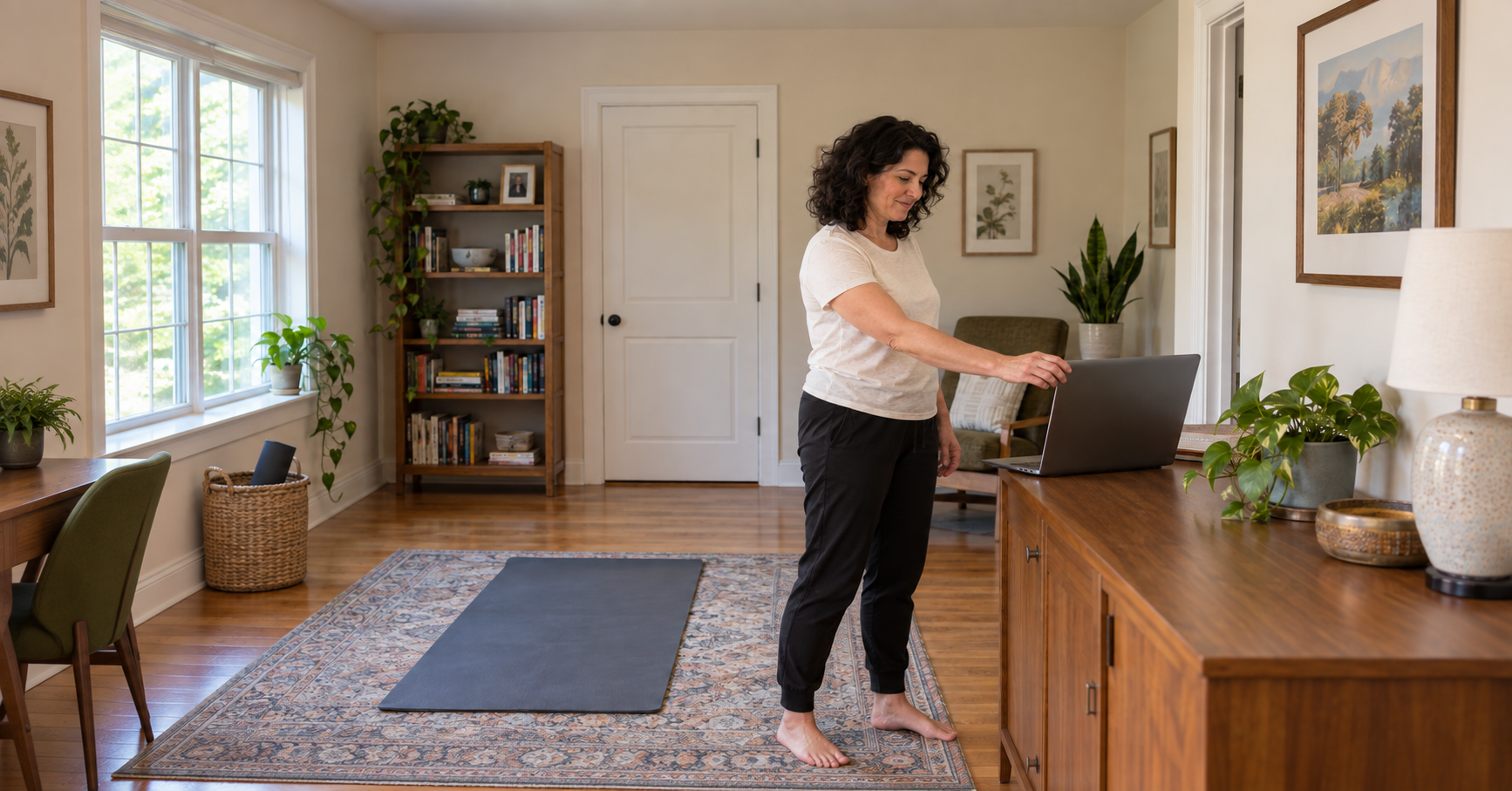
Place it on a sturdy desk or sideboard facing your clear workout area. Keep it back from the edge. Start with the screen tilted toward the space where you will stand, then use the preview to adjust.
If you use a phone or tablet
Use a secure stand on a stable surface. Check that the device will stay put when you step away. A loose phone balanced against a bottle is one more thing to interrupt the class.
If the room is small
Try a position facing the longer clear part of the room. Move furniture only if you can do so comfortably. Keep doorways, cables and your movement area clear. The small-space home gym guide can help with the room itself.
There is no single camera height or distance that works for every room and lens. Start with what you have, check the result and adjust one thing at a time. Do not buy equipment before finding out what the current setup can show.
Run a standing, floor and sound check
- Open the camera preview. Use your class app's preview or video settings before joining when available. If your class uses Zoom on a computer, its Video & effects settings show the selected camera and let you choose another one.
- Stand where you plan to exercise. Check that your head and feet fit. Move your arms only through a comfortable range you expect to use and see whether your hands leave the picture.
- Check the floor position. If the class includes floor work, get into a comfortable familiar position on your mat. Make sure the device can still see you. A good standing view can miss the floor completely.
- Check light and sound. If a bright window behind you makes you a silhouette, try facing toward the light or adjusting the room lighting. Confirm that you can hear the instructor without needing to hold the device.
- Ask for a view check. When you join, ask, “Can you see my full movement area?” The instructor may suggest a different angle for a particular exercise.
Check the background too. Move private paperwork out of view and let other people in the room know the camera is on. Avoid recording anyone without their permission.
Set the camera for the movement, then ask the coach to confirm the view.
Change one thing when the picture is wrong
Your head or feet are cut off
Try more distance between you and the device within the clear space available. Recheck before changing the angle. Never trade a clear floor area for a wider camera view.
The floor exercise disappears
Pause, tilt the device slightly and check again. If standing and floor work need different positions, agree on a simple adjustment with the instructor before class begins.
You cannot see the instructor from the mat
Choose a position where you can check the screen while resting. Ask for a demonstration or verbal cue when needed. Do not twist your neck to watch continuously during an exercise.
The picture freezes or the camera stops
Stop moving while you troubleshoot. Tell the instructor what happened. Rejoin if practical, and ask what you missed before continuing. The instructor cannot give visual feedback on movement they cannot see.
A clear view supports feedback. It cannot show everything or guarantee that an exercise is appropriate or safe for you. Tell the instructor about a concern and stop if a movement causes sharp or unusual pain.
Make the setup easy to repeat
Plan A: Set up a few minutes before class, check both positions and ask the instructor to confirm the view.
Plan B: If the usual room is occupied, use another clear space and repeat the checks. Yesterday's angle may not work in today's room.
Rescue option: If the setup will not work, contact the instructor about the next suitable option. An on-demand session may fit another time, but it does not provide the same live view check.
Missed class: Book the next suitable session and leave the device setup ready if practical. You do not need to add extra exercise to make up for a technical problem.
The minimum useful preparation is a stable device, a clear movement area and an honest view check. A useful sign of progress is spending less time adjusting the camera while still being visible. Save a short note about the position that worked.
Put the setup to use in a live class
Once your device and space are ready, you can focus on following the session and asking for help. Siwicki Fitness offers live classes with coaching, plus on-demand workouts for flexible days. Try a Free Week to see how coached classes fit your routine.
Start Your Free WeekOnline class camera questions
Where should I put my camera for an online fitness class?
Start with a stable surface facing your clear movement area. Use the preview to check that your head, hands and feet fit while standing and that your body stays visible on the floor. Adjust distance and angle to your room, device and instructor guidance.
Do I need a webcam or a tripod for an online workout?
Start with the device you already use. A stable laptop or a phone or tablet in a secure stand may be enough. Check the view before deciding that you need different equipment.
How can I stop my feet disappearing from the camera view?
Step back within your clear space or move the device farther away on a stable surface, then check again. Adjust the angle a little if needed. Do not squeeze into an unsafe area just to fit the frame.
What if my instructor cannot see me clearly?
Pause and ask what needs to change. Adjust the view while you are stationary. If the camera cannot work, tell the instructor so they can explain what support is still possible. A camera view never guarantees exercise safety.